
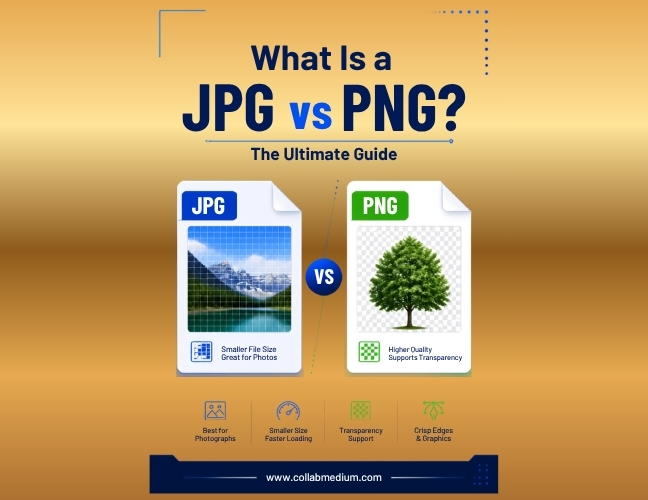
I get this question all the time from bloggers, small business owners, and social media managers. What is a JPG vs PNG, and does it actually matter which one you pick? The short answer is yes, it matters a lot. The long answer is what this guide covers.
I have spent years editing images for websites, Pinterest boards, and print projects. The confusion around what is a JPG vs PNG never really goes away. People upload the wrong format, wonder why their logo looks blurry, or watch their website slow down for no clear reason. Most of the time, the format is the culprit.
This guide breaks down what is a JPG vs PNG in plain English. No technical jargon. Just practical answers you can use today. By the end, you will never have to ask what is a JPG vs PNG again.
Why the JPG vs PNG Confusion Costs You Time and Quality
Picking the wrong image format feels like a small decision. It rarely is. A blurry PNG image for Pinterest gets ignored in a crowded feed. A heavy JPG file slows down your site’s load time and hurts your search rankings.
According to Google’s own research on page speed, 53% of mobile site visits are abandoned if pages take longer than three seconds to load. Image weight is one of the biggest contributors to slow load times. This is exactly why understanding what is a JPG vs PNG matters for anyone managing a website or social media marketing account.
I have watched small business owners lose engagement simply because they used a JPG for a logo that needed a transparent background. I have also seen marketers upload massive PNG files to Instagram when a compressed JPG would have loaded faster with no visible quality loss. These are avoidable mistakes.
What Is a JPG vs PNG? Breaking Down the Basics
Let’s start with the fundamentals. Once you understand what is a JPG vs PNG at a technical level, the rest of your decisions become much easier.
What Is a JPG File?
JPG, or JPEG, stands for Joint Photographic Experts Group. It is a compressed image format built for photographs and images with lots of color variation. JPG files use lossy compression. That means some image data gets discarded permanently to shrink the file size.
The upside is smaller file sizes. The downside is a slight loss in quality every time you save and re-save the file. JPG does not support transparency. The background always fills in with a solid color.
What Is a PNG File?
PNG stands for Portable Network Graphics. It uses lossless compression, so no image data gets thrown away. Every pixel stays exactly as it was created. PNG also supports transparent backgrounds, which is why logos and graphics almost always come in this format.
The tradeoff is file size. A PNG image is typically much larger than a JPG of the same dimensions. That is the core tension behind what is a JPG vs PNG for most everyday users.
JPG vs PNG: Key Differences You Need to Know
Here is a side-by-side comparison that makes the jpg vs png decision simple. I built this table from years of testing both formats across websites and social platforms.
| Feature | JPG | PNG | Best Use Case | Notes |
| Compression Type | Lossy | Lossless | N/A | PNG keeps every pixel |
| File Size | Smaller | Larger | N/A | JPG loads faster |
| Transparency Support | No | Yes | Logos, graphics | PNG only |
| Best Use Case | Photos, blog images | Logos, text overlays | Match content type | See Pro Tip 2 |
| Quality After Editing | Degrades with saves | Stays consistent | N/A | Avoid re-saving JPG |
| Ideal For Pinterest | Sometimes | Usually, for graphics | Pin graphics | See Pinterest section |
| Website Speed Impact | Lower impact | Higher if unoptimized | N/A | Always compress PNG |
This table answers what is a png vs jpg for most practical, everyday scenarios. If your image has a photo with lots of colors, JPG almost always wins. If you need sharp edges, text, or transparency, PNG is the better call.
How Can We Convert Image JPG to PNG (and Back Again)
A common question I get after explaining what is a JPG vs PNG is how to actually convert between the two. Thankfully, this is simple with the right tools.
If you are wondering how we can convert image JPG to PNG, you have several free options. Upload your JPG file, select PNG as the output format, and download the converted file. The process typically takes under a minute.
Best Free Tools for Converting Images
CloudConvert handles JPG to PNG conversions along with dozens of other file types. It supports batch conversion, which saves time if you have multiple images.
FreeConvert offers a simple drag-and-drop interface. It also lets you resize or compress images during the conversion process, which is handy for social media marketing tasks.
iLovePDF is best known for PDF tools, but it also includes an image converter that handles JPG and PNG files quickly and without watermarks.
All three tools are browser-based, so you do not need to install any software. I recommend testing a few conversions with each tool to see which interface you prefer.
How Can We Convert Image JPG to PDF or PDF to JPG
Beyond understanding what is a JPG vs PNG, many readers also need to move images in and out of PDF format. This comes up constantly with scanned documents, portfolios, and printable resources.
If you are asking how can we convert image JPG to PDF, tools like iLovePDF and CloudConvert make it painless. Upload one or several JPG files, arrange the page order, and export a single PDF document. This works well for photo portfolios or combining receipts into one file.
Going the other direction, how can we convert image PDF to JPG is just as simple. Upload your PDF, and these same platforms extract each page as a separate JPG image. This is useful when you need to pull a single photo or graphic out of a longer PDF document.
Choosing PNG Images for Pinterest and Social Media Marketing
Pinterest rewards clean, sharp graphics. A png image for Pinterest usually performs better than a JPG when your pin includes text overlays or a logo. The lossless quality keeps the fonts crisp instead of fuzzy.
For general photography pins, a well-compressed JPG works fine and loads faster. Pinterest’s own guidelines recommend keeping file sizes reasonable to maintain fast load speeds across the platform.
Social media marketing teams often default to PNG for everything, assuming it always looks better. That is not accurate. Instagram and Facebook compress uploaded images automatically, so a huge PNG file offers no real quality advantage over a properly sized JPG in most feed posts.
Common Mistakes People Make With JPG and PNG Files
- Using PNG for every photo. This bloats your website and slows load times. Save PNG for graphics that need transparency or sharp lines.
- Saving a JPG over and over during editing. Each save degrades quality further because of lossy compression. Work from an original file and export a final JPG only once.
- Uploading massive PNG files without compression. A PNG straight from Photoshop can be 5 to 10 times larger than needed. Always run it through a compressor first.
- Assuming file extension alone guarantees quality. Renaming a low-quality JPG to PNG does not restore lost detail. The damage from lossy compression is permanent.
- Ignoring transparency needs until the last minute. Realizing your logo needs a transparent background after building an entire graphic in JPG means starting over.
- Never learning what is a JPG vs PNG in the first place. Most of these mistakes trace back to skipping this basic step. A few minutes of reading saves hours of rework later.
Pro Tips From Years of Working With Image Files
- Tip 1: Compress before you upload. Tools like TinyPNG or the compression features in CloudConvert and FreeConvert can shrink file size by 60 to 80% with barely noticeable quality loss.
- Tip 2: Match the format to the content. Photos and complex images belong in JPG. Logos, icons, and text-heavy graphics belong in PNG. This single rule solves most of what is a JPG vs PNG confusion.
- Tip 3: Keep an original master file. Always store your original PNG or a high-quality source file separately. Export compressed JPG versions for actual web use.
- Tip 4: Check your website speed after uploading. Use Google PageSpeed Insights to see how your image choices affect load time. Heavy PNG files are a common flag.
- Tip 5: Batch convert when possible. If you are converting dozens of product photos, use CloudConvert’s batch feature rather than converting files one at a time.
Once you get comfortable with what is a JPG vs PNG, these decisions become second nature. You will start noticing the right format almost instantly.
Frequently Asked Questions
What is a JPG vs PNG in simple terms?
A JPG is a compressed photo format with smaller file sizes but no transparency support. A PNG keeps full image quality and supports transparent backgrounds, but the files run larger.
Which is better for a website, JPG or PNG?
JPG is usually better for photos because it loads faster and keeps file sizes small. PNG works best for logos, icons, and graphics that need transparency or sharp edges.
How can we convert image JPG to PNG for free?
Free tools like CloudConvert, FreeConvert, and iLovePDF convert JPG to PNG in under a minute. Simply upload your file, select PNG as the output, and download the result.
Does converting JPG to PNG improve image quality?
No, converting a JPG to PNG does not restore quality already lost to compression. The file format changes, but the original lossy compression damage remains permanent.